
Fast, Reliable vSphere Backup Solution from NAKIVO
Protect your vSphere environment (up to vSphere 9) across hosts, clusters, VMs and datastores with a backup and disaster recovery solution, built for vCenter-managed environments.
Start Your Free Trial












Reliable vSphere Backup — Without Operational Complexity
- Native vSphere integration.
- Fast backup and recovery.
- Full visibility across vCenter.
- Lower TCO

Purpose-Built for vSphere — No Manual Workarounds

Fast, Agentless vSphere Backup
Agentless, incremental backups with CBT, LAN-free transfer, compression and bandwidth throttling to improve speed, cut storage and limit network impact.

Instant Recovery
Instant VM recovery (Flash VM boot), granular recovery, full VM recovery, P2V/V2V, direct recovery from tape, failover/failback and more.

vSphere Ransomware Protection and Recovery
Immutable storage in local repositories, cloud and S3-compatible storage and deduplication storage systems. Air-gapped storage on tape. Use Malware Scan to check backups before recovery.

Built-in Disaster Recovery
Real-time VM replicas with RPOs as low as 1 second. Create, test and execute automated DR sequences including planned failover, emergency failover and failback with Site Recovery.

Streamlined Tiering
Backup copies to local folders, NFS/SMB shares, cloud and S3-compatible storage, tape and deduplication appliances, following the 3-2-1-1 backup strategy.

Robust Backup Security
Prevent unauthorized access with Role-based access control (RBAC), two-factor authentication (2FA) and AES-256 encryption at source, in flight and at rest.

Flexible Deployment Options
Install on Windows, Linux, NAS, as a VMware/Nutanix virtual appliance or AMI. Choose what fits your infrastructure—no dedicated backup infrastructure required.

Simple, Automated Administration
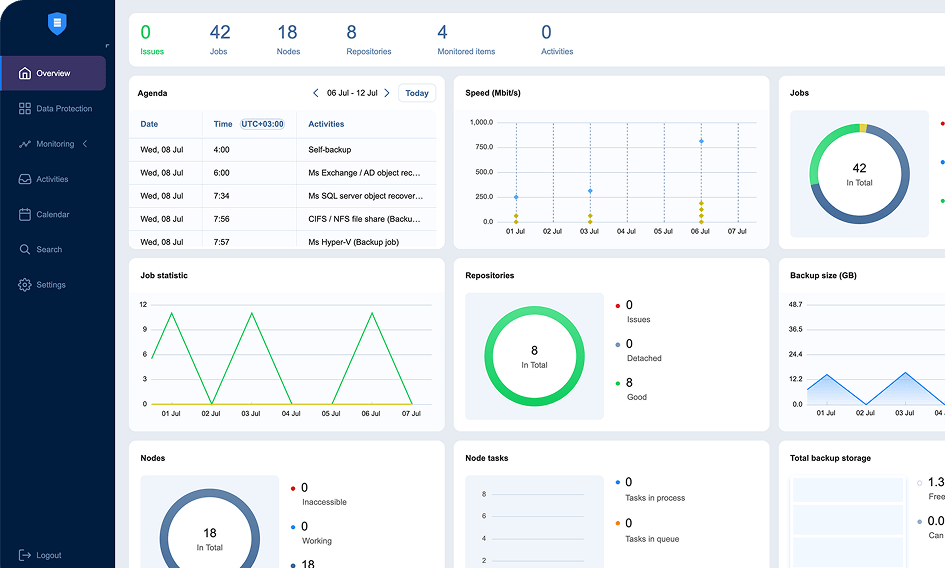
Manage backup activities for hundreds of vSphere hosts from a single web UI with a calendar dashboard, automated workflows and more.

Visibility with built-in vSphere monitoring
Track CPU, RAM and disk usage for hosts, VMs and datastores in real time. Set alerts for critical performance metrics and receive automated reports.

MSP-Friendly Console
Protect and manage up to 100 isolated tenants within a single deployment. Allocate resources to individual tenants and offload tasks to tenants via the Self-Service Portal.

NAKIVO Earns Recognition in
Gartner® Peer InsightsTM Voice of the Customer Report for Enterprise Backup and Recovery Software Solutions
*Based on 427 all-time reviews as of February 2024
**Based on 36 reviews as of February 2024


Where vSphere VM Backup Becomes Harder to Manage
As your vSphere environment grows across vCenter inventories, hosts, clusters and datastores, backup and recovery become harder to coordinate, monitor and scale.
Backup tools that don’t fit natively into vSphere
Generic backup tools can require agents, manual VM discovery or workarounds that add overhead and inconsistent protection.
Protect vSphere VMs without relying on agents, manual discovery or disconnected backup workflows that slow down daily administration.
Backup management gets harder as you scale
Expanding VM inventories, more hosts and sites, and shrinking maintenance windows make it harder to complete jobs on time and enforce consistent policies.
Slash backup windows with incremental backups and built-in optimization. Manage all vSphere backup operations, schedules and policies from one web interface with less manual effort.
Lack of unified visibility
Tracking VM performance, backup status and datastore capacity often requires switching between vCenter and separate monitoring tools; admins can miss issues that slow backups, affect recovery or disrupt workloads.
Track VM performance, backup status and datastore capacity from the same interface you use for vSphere VM backup and recovery instead of switching between separate tools.
Ransomware compromises recovery
Attacks can compromise both vSphere VM backups and production VMs, making restore points difficult to trust, complicating the recovery process.
Secure backups in immutable and air-gapped storage. Use Malware Scan to check backups before recovery to avoid restoring infected data.
Recovery and DR span too many moving parts
Coordinating fast, reliable recovery for full VMs or individual files and folders is often challenging, especially when vCenter is unavailable.
Restore full VMs or files in minutes, or replicate critical vSphere workloads and automate failover, failback and recovery testing.
Expanding vSphere environments lead to rising costs
More VMs, new clusters, longer retention periods and multiple backup copies put increasing pressure on datastores and infrastructure budgets.
Control backup costs as your vSphere environment expands with flexible licensing, multiple editions and deployment options that fit your infrastructure.
Get Affordable VM Backup for vSphere Today
- Pay for the edition that fits your needs
- Choose perpetual or subscription licensing
- Use existing infrastructure for deployment and storage
- Get backup, recovery, DR, cyber resilience and IT Monitoring in one solution
- Access expert 24/7 technical support
See how NAKIVO’s vSphere Backup Solution Fits Your Environment
Start a free trial of NAKIVO’s vSphere backup software and run real backups and recoveries for your actual vSphere workloads—with no feature restriction.
- 15‑day full-featured trial
- Deploy in minutes
- Test the NAKIVO VMware backup solution at your own pace
- No credit card required, no commitments
Prefer a guided walkthrough? Book a tailored demo with a NAKIVO expert.
Get Started in Three Steps
From download to your first vSphere backup in under five minutes.
Join 16,000+ organizations protecting vSphere environments and more with NAKIVO

Real Results for vSphere
Data Protection

3X lower costs
50% Lower costs & faster jobs