Understanding I/O Filters in VMware vSphere Environments
VMware vSphere offers a wide range of storage-related features for virtual machines. In addition to VMware vSAN and Virtual Volumes, VMware I/O filters are effective for VM administration since they unlock advanced features for different scenarios. This blog post explains what VMware I/O filters are, how they work and when to use them.
What Are I/O Filters?
I/O Filters are software modules installed on ESXi hosts and operate within the VMware vSphere Storage I/O Control (SIOC) framework. They intercept disk input/output (I/O) at the VMkernel level, allowing VMware or third-party vendors to implement advanced storage services without requiring changes to the VM or guest OS. Thus, I/O filters can intercept and manipulate the I/O of virtual machines without being dependent on the underlying storage topology. I/O filters were introduced in VMware vSphere 6.0 Update 1. This feature is more effective than previously used kernel-level methods.
Where are I/O filters used in virtualization?
VMware I/O filters are used for data protection, performance optimization, security and monitoring, as they:
- Enable real-time VM replication or backup
- Use caching or tiering to enhance I/O performance
- Scan or encrypt data at the I/O level
- track and analyze I/O operations for troubleshooting or optimization
I/O filters are primarily used in VMware vSphere Virtual Volumes (vVols) and VMware vSphere APIs for I/O Filtering (VAIO) infrastructure. Some of the use cases are:
- VM replication
- Inline deduplication and compression
- Real-time encryption and malware scanning
- Agents that capture disk-level changes for efficient backup
How Do I/O Filters Work?
Below, you can see the step-by-step working principle of VMware I/O filters:
- A VM issues an I/O request. The virtual machine performs a read or write operation on its virtual disk (VMDK). This request is passed down to the VMkernel layer of the ESXi host.
- VMkernel intercepts the I/O. Before the I/O reaches the physical storage (like SAN/NAS/local disk), the VMkernel checks for any I/O filters registered via the VAIO (vSphere APIs for I/O Filtering) framework.
- The filter processes the I/O.
- If one or more filters are applied to the VM, each relevant I/O filter:
- inspects the I/O operation
- optionally modifies, duplicates, redirects or logs the data
For example, a replication filter may make a copy of the write operation and send it to a remote site.
- The I/O continues to a datastore. Once the filter(s) have processed the request, the I/O proceeds to the underlying storage (datastore) as usual.
- A confirmation is sent back. After the storage operation is complete, the confirmation is sent back up the stack, again possibly passing through filters (for example, for logging or verification) until it reaches the VM.
Multiple I/O filters can be applied to the same VM. They are executed in a defined order, managed by vSphere. The order can be critical. For example, you may want encryption to happen before replication. I/O filters are installed at the ESXi host level and are managed centrally via vCenter Server. Filters are applied per VM and per disk to provide granular control.
The role of vSphere APIs for I/O filtering (VAIO)
VAIO (vSphere APIs for I/O filtering) is a framework provided by VMware to enable third-party vendors (and VMware itself) to intercept and manipulate virtual machine I/O operations on ESXi hosts. VAIO is a technology and API (Application Programming Interface) that allows direct access to the input/output stream of the VM’s guest operating system (OS). VAIO is based on the mechanism of Storage Policy Based Management (SPBM) that is intended to manage rules of storing VMs and their work with storage.
VAIO is the official API that lets developers build I/O filters that can observe, modify or enhance VM disk I/O, without touching the VM’s OS or applications. The technical implementation of this mechanism requires the use of the VAIO driver, also known as a filter driver. This driver is installed on an ESXi host as a VIB package. No special software is required to be installed in the guest OS of a VM. Below, you can see an image explaining the data path from a virtual machine to a physical storage device.
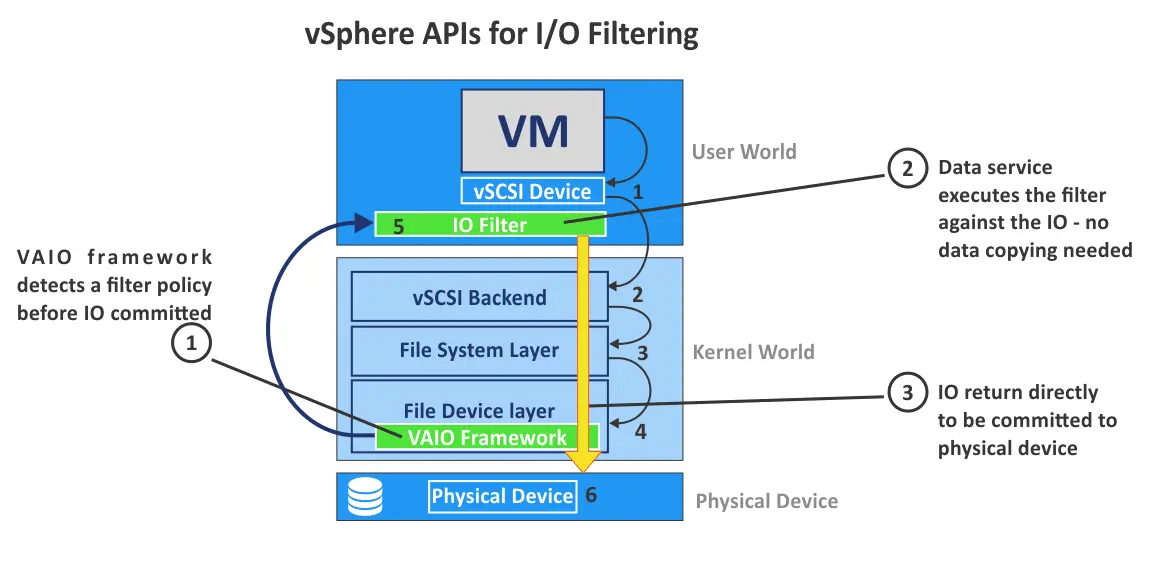
In the image above, you can see two components related to VAIO. The first component is a VAIO framework that operates on a VMkernel level and defines the storage policy. The second component is the IO filter, which is software working in the user world of an ESXi host. The filter driver provides data replication, caching or other functions and then transfers this data to be written on a physical storage device.
This architecture allows the I/O filter driver to access the input/output stream without significantly impacting the performance of executing SCSI commands. Another feature of the I/O filter is the ability to access the input-output stream to the recording side (from OS to storage) and the reverse direction (the result of command execution). These features are especially useful for data replication to verify disk writing operations and ensure consistency.
SCSI commands get to the I/O filter right after they pass the SCSI emulation layer (vSCSI), which allows you to use VAIO for different storage types – VMFS, NFS, SCSI and vSAN. The I/O filter intercepts commands before sending them to the network stack for storage, ensuring data consistency and security.
The filter driver operates at the User World level, which means it doesn’t impact the stability of the ESXi operation. Even if the VMware I/O filter terminates its operation, the main stack of SCSI commands in the VMkernel continues to operate normally.
The filter operates at the level of specific VMDK virtual disks of particular VMs to allow using Storage Policy Based Management (SPBM) and applying the policies to specific virtual machines and services.
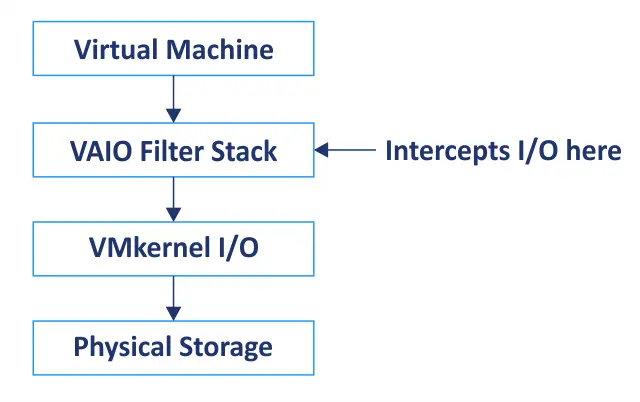
VAIO acts as a filter manager, loading filters (created by VMware or third parties) onto the ESXi host. These filters sit in the I/O path and can manipulate traffic as needed.
Examples of VAIO use cases are listed in the table.
|
Use Case |
How VAIO Helps |
|
Backup |
Captures block-level changes efficiently |
|
Replication |
Sends writes to a secondary site in real time |
|
Caching |
Accelerates reads by storing data in faster media |
|
Encryption |
Encrypts disk writes before they hit the storage |
|
Antivirus |
Scans files in transit to detect threats |
Types of I/O Filters
The I/O filter technology can be used for different purposes. Hence, VMware I/O filters can be categorized based on the purpose of use.
- Replication. Synchronous and asynchronous replication can be configured using a data protection solution and the appropriate VMware I/O filters. New data written by the source VM and data changes are tracked with a filter and replicated to the destination VM. The latency is low, allowing VM replication to be performed in real-time.
- Encryption. Third-party software can use the VAIO mechanism to encrypt and decrypt the VM’s data stream on the fly. Thus, data written to physical storage is already encrypted. The granularity of VAIO allows you to handle data from one application, not from the entire virtual machine.
- Deduplication. vSAN already uses this mechanism. It is possible to deduplicate data that passes the I/O filter driver in real time and then store this data in the destination storage to save disk space. VMware partners can also use this technology.
- Tiering. Depending on its importance, you can store data in storage with different performance levels, known as storage tiers. The VAIO mechanism can analyze the nature of this data and define the final storage destination.
- Caching and analytics. It is possible to directly analyze the data flow of a particular virtual machine and, based on the collected data, create different solutions, such as caching solutions. Then, you can find data of particular applications in this VM traffic or use the write-back caching mechanism.
The VAIO technology supports live VM migration with vMotion (VAIO must be enabled on the destination host) and DRS clusters (must be enabled on all hosts).
I/O Filter Use Cases and Benefits
VMware I/O filters provide a wide set of benefits with advanced features in VMware vSphere, including data protection and security. Let’s go over the use cases and advantages of I/O filters, focusing on the three most common scenarios.
Backup and replication
The primary use cases are:
- I/O filters capture changes to virtual disk data in real time.
- These changes are sent to a backup system or a replication target without interrupting the VM.
Data protection solutions that use VAIO-based filters to perform agentless backups are one example.
The main benefits are:
- Near-zero impact on VM performance during backup windows
- Crash-consistent or application-consistent snapshots
- Block-level tracking makes backups faster and more efficient
- No need for guest agents, reducing complexity
Disaster recovery and high availability
The primary use cases are:
- I/O filters allow continuous data replication to another site or storage system.
- Helps create secondary copies of VMs that can be activated in case of failure.
- Works with VMware products, such as Site Recovery Manager (SRM), or third-party disaster recovery (DR) solutions.
The main benefits are:
- Real-time or near real-time replication ensures minimal data loss (low RPO).
- Fully integrated with vSphere vMotion, DRS and HA for seamless failover
- Enables automated disaster recovery plans and non-disruptive disaster recovery testing
- Great for regulatory compliance and business continuity
Data encryption and security
The primary use cases are:
- I/O filters can encrypt data at rest as it is written to storage.
- Filters can also perform inline malware scanning or data loss prevention (DLP) checks.
- This is done before the data hits the datastore, providing secure I/O at the hypervisor level.
The main benefits are:
- No changes needed in guest OS or applications
- Helps with regulatory compliance (GDPR, HIPAA, PCI DSS and others)
- Protects against data theft, even if storage is compromised
- Centralized encryption with policy-based management via vCenter
System Requirements and Compatibility
You must meet the system requirements to use VMware I/O Filters in VMware vSphere, including third-party applications working with vSphere.
Datastore and ESXi version support
The ESXi version must be ESXi 6.0 Update 1 or newer. It is recommended that you use vSphere 6.5 or later for broader compatibility and better performance. The latest versions offer full support for the most advanced I/O filters and integration with backup, disaster recovery and security solutions.
Ensure the VAIO plugin version is compatible with the version of ESXi you are using. VMware and third-party vendors usually provide compatibility matrices. If needed, contact your software vendor for more details.
Datastore compatibility with VMware I/O filters is explained in the table below.
|
Datastore Type |
Supported |
Notes |
|
VMFS |
Yes |
Fully supported |
|
NFS |
Yes |
Supported, but performance may vary with filter type. |
|
vSAN |
Yes |
Supported. Offers the best integration with VMware-native services. |
|
vVols (Virtual Volumes) |
Limited |
Not all I/O filters are compatible with vVols. Check vendor support. |
|
Raw Device Mapping (RDM) |
No |
RDMs are not supported for I/O filtering. |
If you use a cluster, use filters to ensure that datastores are accessible to all hosts in the cluster. This is important for vMotion and HA compatibility.
VM and hardware considerations
Virtual machine configuration requirements are as follows:
- VMware I/O filters are applied at the VMDK (virtual disk) level, which means that the VM must use supported virtual disk types.
- Thick or thin provisioning is supported.
- The virtual machine hardware version must be compatible with the ESXi host (virtual hardware version 11 and higher is recommended).
Virtual machine configurations that are not supported:
- Shared VMDKs in multi-writer mode (clustering setups like Microsoft Cluster Service – MSCS).
- Independent disks (used for some backup scenarios).
- Disks in physical RDM mode.
Supported hardware includes:
- x64 processors (CPUs – central processing units)
- Compatible network interface controllers (NICs) and host bus adapters (HBAs) – according to the VMware hardware compatibility list (HCL)
- A VMware vSphere cluster with shared storage if you plan on using High Availability (HA) or Distributed Resource Scheduler (DRS).
Ensure the additional hardware requirements below are met:
- Sufficient RAM/CPU overhead on hosts for filters that perform compute-heavy tasks (encryption, deduplication, etc.).
- SSD/NVMe storage is available if using caching or performance-enhancing I/O filters.
How to Set Up and Manage I/O Filters
VMware I/O filters can be installed manually or automatically in NAKIVO Backup & Replication:
- Manual installation requires configuration in VMware vCenter and additional steps in NAKIVO Backup & Replication.
- Automatic installation of VMware I/O filters is available via the Real-time service wizard in NAKIVO Backup & Replication.
Check out the real-time replication guide with screenshots and practical examples to learn how to set up I/O filters. You can also find detailed steps in the NAKIVO User Guide.
How NAKIVO Uses I/O Filters to Improve Backup Efficiency
NAKIVO Backup & Replication is a reliable data protection solution with a wide set of advanced features. The NAKIVO solution supports traditional periodic replication and real-time replication for VMware vSphere virtual machines. I/O filters are used to intercept and manipulate VM I/O to create real-time replication jobs.
Note that NAKIVO has developed its own I/O filter (named “nakfilter”), which is certified by Broadcom (VMware) for the Real-Time Replication feature for VMware virtual machines. You can automatically install the VMware I/O filter directly from the NAKIVO Backup & Replication web interface, streamlining the use of the Real-Time Replication feature.
Real-time replication improves recovery point objectives for disaster recovery purposes and reduces data loss in case of failure. This improves business resilience and ensures robust data protection. With real-time replication using VMware I/O filters, you can achieve the shortest RPO and implement strict disaster recovery strategies for critical workloads.
Conclusion
Virtual machine I/O filtering is a powerful feature that provides advanced capabilities for storage operations in VMware vSphere. I/O filters are used for real-time replication, caching, compression, encryption and other purposes. VMware APIs for I/O filtering allow vendors to create third-party solutions, including those for continuous data protection and VM replication. NAKIVO Backup & Replication works with VMware I/O filters and supports real-time replication.