VMware ESXi vs vSphere vs vCenter: Complete Comparison
VMware offers a wide range of products, and understanding their different use cases may be overwhelming. In this blog post, we cover the differences between three commonly used technologies in VMware environments:
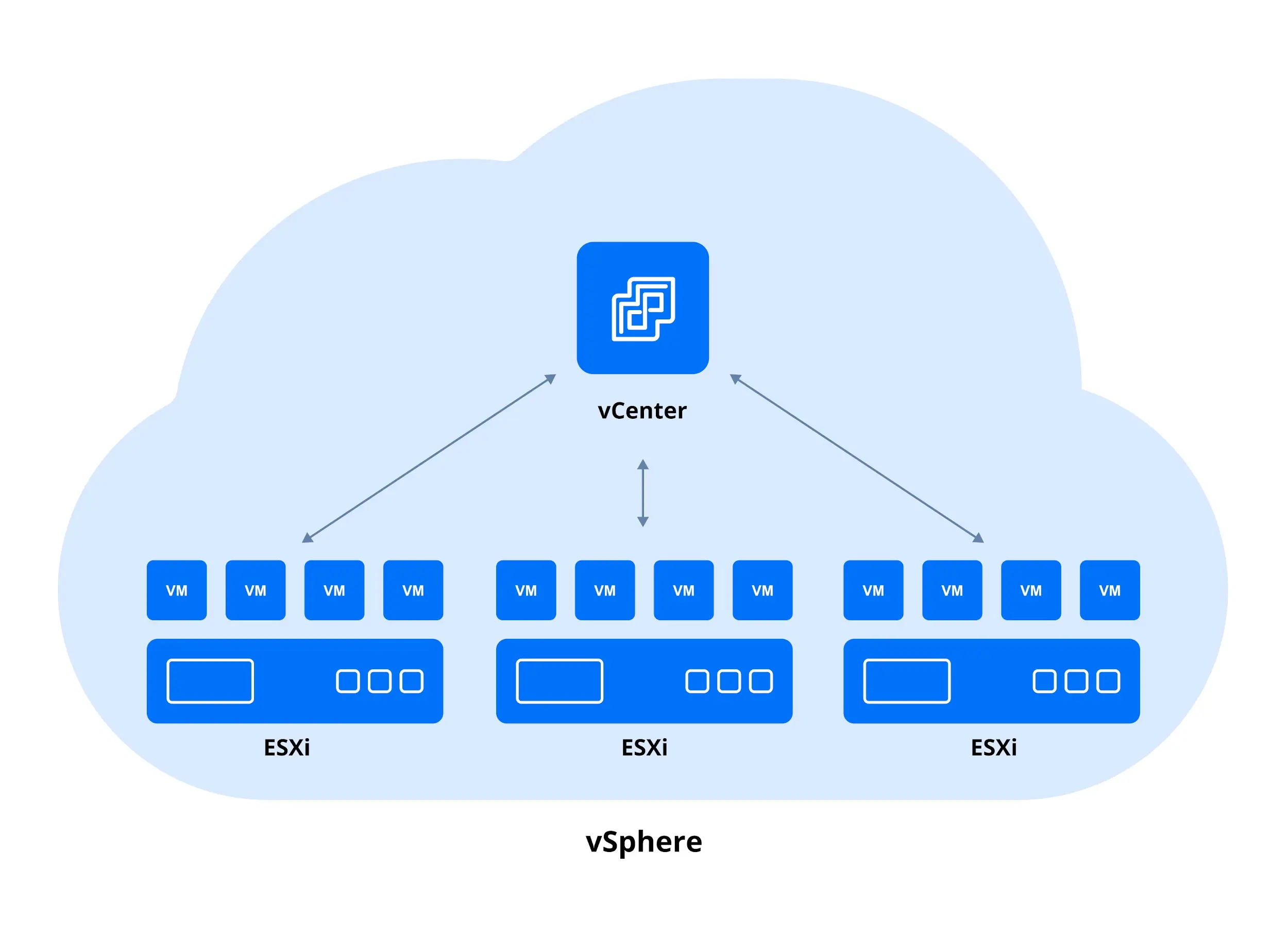
- vSphere is VMware’s enterprise virtualization platform and the basis for cloud-based infrastructures, including private clouds. VMware vSphere contains ESXi hosts and vCenter Server.
- vCenter Server is the centralized platform for managing vSphere environments, including ESXi hosts and virtual machines, used for assigning roles to users, creating new VMs, searching the inventory and much more.
- ESXi is the hypervisor that enables the deployment and operation of virtual machines (VMs).
It’s important to note that any ESXi vs. vSphere vs. vCenter comparison should start with a caveat: these technologies are complementary rather than substitutes for one another.
What is VMware vSphere?
As defined by VMware, vSphere is an enterprise-scale virtualization platform. In fact, vSphere is the brand name for VMware’s suite of virtualization products and features. This solution allows you to build a reliable and resilient infrastructure that suits virtually any business need while staying within budget.
The functionality of vSphere greatly helps existing data centers shift to cloud computing, offering a means of increasing hardware utilization from 5–15% to as much as 80% or higher without compromising on performance. One of the benefits of vSphere is its potential to optimize resource consumption, reduce unplanned downtime and fully eliminate the downtime required for storage and server maintenance.
Here is a brief overview of vSphere functionality:
- Virtual data center management: Create and manage multiple VMs with ease.
- Migration: Perform live migration of your workloads and maintain your datacenters without downtime.
- Flexibility: Build an environment that satisfies your needs using vSphere and the VMware stack, as well as open-source frameworks like OpenStack or VMware’s Integrated OpenStack add-on.
- Support for remote locations: Manage your remote offices with minimal local IT support.
A comprehensive description of vSphere’s functionality and features would require a separate blog post. VMware calls vSphere “the heart” of the modern software-defined data center (SDDC), which allows you to run, manage, connect and protect your applications in a common environment across multiple clouds.
vSphere vs ESXi: Virtualization Platform and Hypervisor
ESXi is a hypervisor, or a type of virtualization software that allows you to create, run and manage multiple virtual machines using a single physical host. ESXi is installed directly on a physical machine, meaning it is a type-1 hypervisor, also known as a bare-metal hypervisor. Unlike its predecessor (ESX), ESXi operates independently of any general-purpose OS, which significantly enhances security and simplifies management. Additionally, the architecture of ESXi enables you to expedite the deployment and configuration process.
One of ESXi’s key benefits, as mentioned above, is the high level of security it provides. ESX and ESXi are equivalent in terms of functionality and performance. The difference lies in the architecture. In ESXi, the Linux-based service console has been replaced with new remote command line interfaces. This reduces the on-disk footprint to less than 228 MB for ESXi 8 (as opposed to 2 GB in ESX 3). In turn, a smaller footprint allows you to reduce the overall attack surface. ESX was deprecated with the release of ESXi 5.0.
A virtual representation of the processing and memory resources of a physical machine running ESXi is known as a host. Two or more ESXi hosts can be grouped into a cluster. You can dynamically add or remove machines running ESXi from a cluster and partition processing and memory resources from hosts and clusters into a hierarchy of resource pools.
What is VMware vCenter Server?
VMware vCenter Server provides centralized management of the virtual infrastructure. You can control your hosts and VMs from a single console or web-based user interface, which enhances visibility and helps prevent errors. Deploying vCenter unlocks advanced features in VMware vSphere that are not available when using standalone ESXi hosts.
vCenter Server allows you to optimize routine operations and daily tasks, even when managing a large-scale infrastructure. With this functionality, you gain in-depth insights into the configuration of the key components in your environment. The HTML 5-based vSphere Client provides access to the key functions of vSphere from any browser.
Overall, you can run hundreds of workloads, thereby reducing the effort required to manage a physical environment of the same scale. Additionally, the vCenter Server is now running VMware’s own Linux-based Photon OS, eliminating the need for third-party patches or upgrades. Some of the key features of vCenter Server include:
- Single sign-in: Allow users to access the vCenter Server instances without further authentication after they log in for the first time.
- Inventory search: Access your VMs, hosts, datastores and networks in one click.
- Extensibility and scalability: Run up to 2,500 hosts and 40,000 VMs with a single instance of vCenter Server (v9.0). Configure High Availability (HA) and Distributed Resource Scheduler (DRS) clusters.
- Alerts and notifications: Automatically initiate the necessary workflows to prevent or address emerging issues.
- Host profiles: Capture the configuration of your host, including networking, storage and security settings, to deploy it to other hosts.
- VMware Lifecycle Manager (former vSphere Update Manager): Update and upgrade ESXi hosts by installing patches and update packages centrally.
The list of vCenter Server features can be extensive. You can install add-ons to vCenter, configure a vSphere cluster, enable distributed virtual switches, vSAN and vVols as well as deploy NSX to use them all in VMware vSphere. Overall, its key benefit is that it provides centralized and proactive management of your entire infrastructure, helping you meet the ever-growing demands of your business.
ESXi vs vSphere vs vCenter: How They Interact
vSphere is the name for VMware’s entire cloud computing virtualization platform. Its mission is to enable you to virtualize and aggregate the resources of the underlying physical hardware, and provide pools of virtual resources to your datacenter.
In turn, ESXi and vCenter Server are two of the components of vSphere. ESXi, the hypervisor, is the virtualization layer that runs directly on physical servers. Its core function is to abstract the resources of the host, such as CPU, memory and storage capacities, into multiple VMs. vCenter Server can be considered the central point for configuring, provisioning and managing the virtual infrastructure. The functionality of vCenter Server allows you to control access permissions, monitor performance and set up notifications. To connect remotely to vCenter Server, you can use the HTML5 vSphere Client. This allows you to access vCenter Server from a browser or other operating systems.
The ESXi vs vSphere vs vCenter comparison table below provides a complete summary.
|
|
VMware ESXi |
VMware vCenter |
VMware vSphere |
|
Type |
Type-1 hypervisor |
Management software |
Product suite (platform) |
|
Role |
Installs directly on physical hardware |
Provides centralized management for multiple ESXi hosts and VMs |
The umbrella term for VMware’s virtualization platform (includes ESXi + vCenter + add-ons) |
|
Deployment |
Installed on physical servers |
Deployed as vCenter Server Appliance (VCSA) on VMs |
Purchased/licensed as a package |
|
Functionality |
Runs and manages VMs on one physical host |
Centralized control of clusters, resource scheduling, HA, DRS, vMotion, templates, permissions |
Bundles the hypervisor and management features into a virtualization platform |
|
License scope |
Licensed per CPU/Core |
Licensed per instance (or included in vSphere bundles) |
Licensed per edition (vSphere Foundation, vSphere+) |
|
Management scope |
Host-level management only (basic web client/CLI) |
Multi-host, multi-cluster management with advanced features |
Defines which features are available based on the chosen edition |
|
Use case |
Running VMs on a single server or a small standalone environment |
Managing multiple ESXi hosts, clusters and enterprise features |
An enterprise-level virtualization environment that scales across datacenters |
|
Examples of features |
VM creation, basic resource allocation, snapshots (limited) |
vMotion, HA, DRS, template management, centralized RBAC, performance monitoring |
Everything mentioned, plus ecosystem integrations (backup APIs, storage, networking, automation) |
Experience shows that even with a large number of applications installed, most physical machines remain underused. VMware vSphere addresses this issue, enabling you to allocate resources more efficiently. A single physical machine can be used to create multiple independent VMs, each running different OS and applications. Similarly, you can virtualize your entire infrastructure, even if it consists of hundreds of interconnected physical machines and storage devices.
Conclusion
Understanding the distinctions between ESXi vs vSphere vs vCenter helps you design, manage and optimize your virtual environment more effectively. Each VMware component serves a unique purpose, yet they work together to deliver a unified virtualization platform. With the right combination, organizations can improve efficiency, scalability and control across their IT infrastructure.